Blogs
SFM Compile: Master Every Model Build with Confidence Today


Creating custom content for Source Filmmaker is an exciting way to bring original characters, props, and environments into cinematic projects. However, every successful custom asset depends on one critical process: sfm compile. Whether you are designing a detailed game character or importing a simple environmental object, your model must be converted into a format that the Source Engine understands. Many beginners struggle with missing textures, broken animations, or failed imports because they overlook important compilation steps. Learning how the process works not only saves countless hours of troubleshooting but also gives creators complete control over the quality and performance of their assets.
Understanding What SFM Compile Really Means
The term sfm compile describes the process of converting editable 3D assets into the Source Engine’s native model format used by Source Filmmaker. Unlike modern game engines that can often import FBX files directly, Source Filmmaker requires compiled files such as MDL, VVD, VTX, and sometimes PHY before a model can appear correctly inside the software. During compilation, geometry, skeletons, animations, texture references, and physics information are combined into a structured package. This system was designed by Valve for the original Source Engine and remains the standard workflow for anyone creating custom assets for Source Filmmaker.
READ MORE: fundfireinsight.com: Smart Finance and Business Insights
The Technology Behind Source Filmmaker
Valve originally developed Source Filmmaker as an internal production tool for creating promotional videos for games such as Team Fortress 2. In July 2012, the company released the software publicly through Steam, giving artists and filmmakers access to the same cinematic tools used inside Valve. Because the software runs on the original Source Engine, it follows the engine’s traditional asset pipeline, which depends on compiled model files rather than editable project formats. Even today, this architecture makes the compilation process one of the most important technical skills for serious Source Filmmaker creators.
How the SFM Compile Process Works
A typical sfm compile workflow begins inside modeling software such as Blender, Autodesk Maya, or 3ds Max. After the model is completed, it is exported into an intermediate format like SMD, DMX, or FBX using Source-compatible plugins. The next step involves creating a QC script, which acts as an instruction file for Valve’s StudioMDL compiler. The QC script specifies model names, material locations, animation sequences, collision meshes, and output directories. StudioMDL then processes every component and generates the MDL, VVD, VTX, and related files that Source Filmmaker loads during production. If every path and setting is configured correctly, the finished model becomes immediately available inside the software.
Essential Tools Used Throughout the Workflow
Several professional and community-developed tools make the compilation process much easier. Blender has become the most widely used modeling application because it is free, open source, and supports multiple Source Engine export plugins. Autodesk Maya and 3ds Max remain popular among professional artists who require advanced rigging and animation capabilities. Valve’s official Source SDK includes StudioMDL, the compiler responsible for creating engine-ready model files. Many creators also rely on Crowbar, a graphical utility that simplifies compiling and decompiling models while displaying detailed error logs. Text editors such as Notepad++ are commonly used to write and edit QC scripts efficiently.
Common Errors That Prevent Successful Compilation
Even experienced artists occasionally encounter problems during sfm compile. One of the most common issues is the well-known purple-and-black checkerboard texture, which usually appears when the material paths inside the QC file or VMT files are incorrect. Models may also fail because of missing textures, invalid bone names, broken weight painting, incorrect scale values, or improperly exported animation sequences. In many cases, StudioMDL generates detailed compiler logs identifying exactly where the error occurred. Carefully reading these logs often saves far more time than repeatedly attempting to compile without understanding the root cause.
Best Practices for Reliable Results
Building a consistent workflow dramatically improves compilation success. Organizing project folders so that models, materials, textures, animations, and QC scripts each have dedicated directories helps prevent missing file references later. Many experienced creators recommend compiling after every significant modification instead of waiting until an entire project is finished. Testing models immediately inside Source Filmmaker allows small problems to be corrected before they become difficult to diagnose. Maintaining clear naming conventions for bones, materials, and exported files also reduces compatibility issues throughout production.
Advanced Features for Professional Creators
Once creators become comfortable with the basics, sfm compile supports several advanced capabilities that improve both visual quality and performance. Level of Detail models, commonly called LODs, automatically reduce polygon counts as objects move farther from the camera, improving rendering efficiency. Physics meshes allow realistic interactions with ragdolls and movable objects. Facial flex controllers enable detailed lip-sync animation and expressive character performances. Custom shaders can also enhance lighting, reflections, and surface appearance. Larger production teams frequently automate repetitive compilation tasks using batch scripts and Python-based utilities, allowing hundreds of assets to be processed with minimal manual work.
Why Learning SFM Compile Has Long-Term Value
Although Source Filmmaker is more than a decade old, the skills learned through sfm compile remain highly relevant. Understanding model preparation, skeletal animation, material systems, file structures, and engine pipelines provides valuable experience for artists interested in modern game development. Many of the same principles apply when working with engines such as Unity, Unreal Engine, and Source 2. Learning the complete workflow also develops stronger problem-solving abilities, since creators become familiar with debugging technical issues rather than relying entirely on automated import systems. This knowledge benefits hobbyists, freelance artists, and aspiring game developers alike.
The Future of Source Filmmaker and Compilation
Valve introduced Source 2 Filmmaker alongside the development tools for Half-Life: Alyx in 2020, demonstrating that cinematic production remains an important part of the company’s ecosystem. Nevertheless, the original Source Filmmaker continues to enjoy an active community of filmmakers, animators, educators, and modders who regularly publish new tutorials, custom assets, and collaborative projects. Community developers also continue improving exporters, plugins, and automation utilities that simplify sfm compile workflows. While newer engines continue evolving, the principles behind proper asset compilation remain fundamental to creating reliable and professional-quality digital content.
Conclusion
Mastering sfm compile is one of the most valuable skills any Source Filmmaker creator can develop. Although the process may seem technical at first, understanding how models, textures, animations, and QC scripts work together transforms compilation from a frustrating obstacle into a predictable workflow. By using reliable tools, organizing project files carefully, studying compiler logs, and testing assets frequently, creators can produce stable, high-quality models that perform exactly as intended. As the Source community continues to share knowledge and improve available tools, learning this workflow today provides a strong foundation for future creative and professional opportunities.
FAQs
What is sfm compile used for?
sfm compile converts editable 3D assets into Source Engine model files that Source Filmmaker can load. Without compilation, custom models, animations, and physics data cannot function correctly inside the software.
Which software is commonly used before compiling models?
Most creators build assets in Blender because it is free and supports Source Engine plugins. Professional artists may also use Autodesk Maya or 3ds Max before exporting files for compilation through StudioMDL.
Why do compiled models display purple-and-black textures?
This usually happens because material files cannot be located. Incorrect texture paths, missing VMT files, or misplaced VTF textures prevent Source Filmmaker from loading the correct materials during rendering.
Is Crowbar required for the compilation process?
No. Crowbar is not mandatory because StudioMDL performs the actual compilation. However, Crowbar provides an easier graphical interface, detailed compiler logs, and additional tools that simplify compiling and troubleshooting.
Can beginners learn sfm compile without programming experience?
Yes. Basic compilation mainly requires understanding project folders, QC scripts, and export settings rather than advanced programming. With practice and community tutorials, most beginners can successfully compile simple models and gradually move toward more advanced character assets.

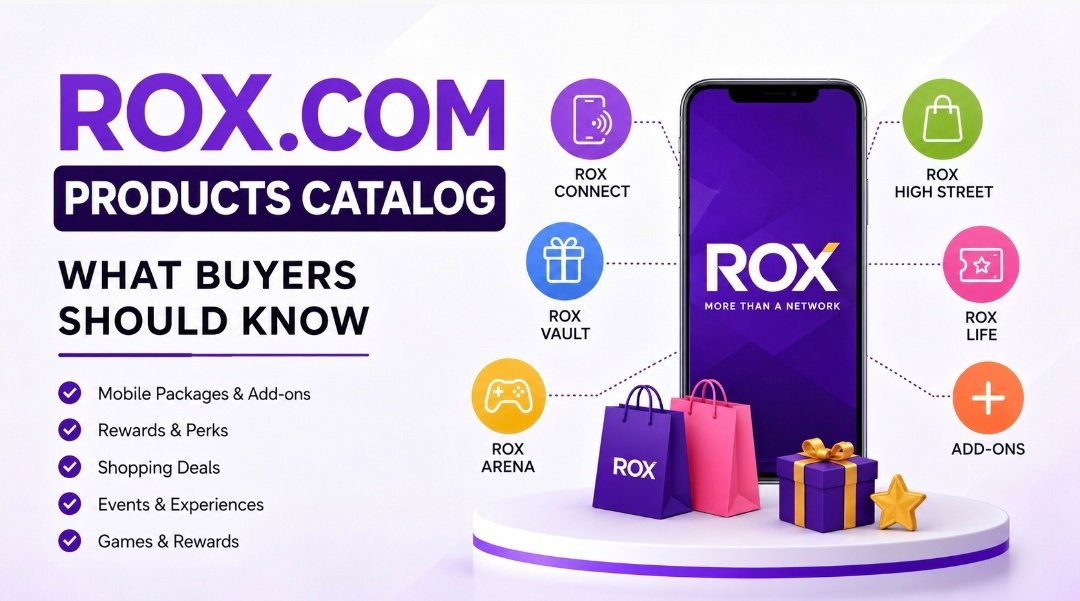
The search for the rox.com products catalog usually starts with a simple question: what exactly is ROX selling, and where do those offers live? The answer is more interesting than a basic store page, because ROX is built as a mix of mobile packages, rewards, perks, deals, and app-based experiences rather than a single product shelf. Its official pages currently point people to ROX Connect, Vault, add-ons, High Street, Life, and Arena, which means the catalog is wider than many buyers first expect.
That is exactly why the rox.com products catalog matters to anyone trying to compare options quickly. If you only look for “plans,” you may miss perks, sharing features, event access, or shopping offers that change the real value of the package. The official brand positioning also shows that ROX is meant for a digital-first audience that wants more than connectivity alone.
What the rox.com products catalog really is
The rox.com products catalog is not a traditional ecommerce catalog in the usual sense. Instead of only listing physical items, it combines telecom-style bundles with digital benefits, lifestyle access, and app-based extras. ROX describes itself as “more than a network,” and its live site organizes the offer around packages, vault-style perks, add-ons, and experiences.
That structure matters because it changes how a buyer should read the page. Someone searching the rox.com products catalog may be looking for a plan, a discount, a reward, or a shopping item, and all of those can live under the same brand umbrella. ROX’s official app pages reinforce that idea by showing ROX Connect, ROX Vault, ROX Life, ROX High Street, and ROX Arena as the main user paths.
READ MORE: Magfusehub com: What It Is and Why It Matters
The main catalog groups you will see
ROX Connect is the core part of the rox.com products catalog for many users. On the live site, it is presented as the place for packages, vault access, and add-ons, with plans such as Just Vibe, Basic Vibe, Crazy Vibe, Insane Vibe, and Share Vibe. Those names are not random branding; they point to different data, SMS, and minutes mixes so buyers can choose according to usage instead of guessing from a single generic bundle.
Beyond the base packages, the catalog also stretches into lifestyle features. ROX Vault is tied to perks, discounts, and giveaways, while ROX Life focuses on events, concerts, gaming tournaments, and exclusive merchandise. ROX High Street is where shopping and branded deals come into play, and ROX Arena is the games-and-rewards layer that gives the app a more interactive feel.
Why the rox.com products catalog feels like an app, not a storefront
A normal product catalog usually asks a buyer to browse, add to cart, and check out. The rox.com products catalog works differently because the app sits at the center of the experience, and the official description frames it as a place to manage mobile usage, access perks, and explore experiences in one flow. That is why ROX feels closer to a lifestyle dashboard than a simple shopping site.
That app-first model also changes how the catalog is updated and used. Instead of treating every offer as a one-time purchase, ROX ties many items to active usage, rewards, and renewal cycles, which means the buyer has to think about ongoing value. The rox.com products catalog is therefore less about one product and more about a connected system of plans, benefits, and app actions.
How to compare options inside the catalog
The smartest way to read the rox.com products catalog is to start with your real usage. If you need more data than calls, look at the GB amount first and ignore the flashy naming until the end. If you make more calls than you stream, then minutes and SMS should matter more than the highest data number on the page. The best package is the one that matches your habits, not the one with the loudest name.
Another useful step is to compare whether the package is personal or shared. ROX has a Share Vibe option that is built for group use, and the catalog also mentions adding contacts from the app after subscription. That makes the rox.com products catalog more flexible than a plain one-user bundle, but it also means you need to read the sharing rules carefully before choosing.
What ROX package names are trying to tell you
The package names in the rox.com products catalog are built around lifestyle language, not technical jargon. Just Vibe, Basic Vibe, Crazy Vibe, Insane Vibe, and Share Vibe are designed to feel easy to remember, but they also hint at different levels of usage and ambition. That kind of naming works well for younger audiences because it makes the catalog feel less stiff and more personal.
Names like these can help, but they can also hide the real decision points if a buyer is not paying attention. A friendly title does not tell you whether the package is right for streaming, gaming, calling, or group sharing, so the rox.com products catalog still needs a careful read. The better habit is to use the name as a label and the included benefits as the actual decision tool.
Where shopping fits into the rox.com products catalog
The shopping side of the rox.com products catalog is what makes it different from a standard telecom page. ROX High Street is described in the app store listing as a place for handpicked deals from fashion and handset brands, which means the catalog is not limited to connectivity alone. In recent ROX updates, the brand has also highlighted authentic Apple products available through the app, showing that the catalog can stretch into premium device shopping as well.
That broad mix can be useful, but it also needs a careful approach. If you land on the rox.com products catalog expecting a clean electronics store, you may be surprised to see plan bundles, rewards, event perks, and shopping offers side by side. The real strength of the platform is that it tries to connect those pieces into one user journey instead of forcing people to jump between separate services.
What buyers should check before choosing anything
Before you subscribe or order through the rox.com products catalog, check the renewal behavior first. ROX’s own FAQ includes topics like auto-resubscription, package sharing, add-ons, roaming, and support, which tells you that the details matter as much as the headline offer. If you skip those details, a package can look cheap on paper and still feel inconvenient later.
Support access matters too, especially if the catalog item is tied to usage or active app management. The live package page lists contact options, and the app store review section shows that some users have raised concerns about usability and repeating subscription steps. Those reviews are personal opinions, not final verdicts, but they do show why checking the small print in the rox.com products catalog is a smart move.
Where people often misunderstand the catalog
One common mistake is treating the rox.com products catalog like a normal online shop and expecting every item to behave the same way. A plan, a perk, a reward, and a shopping offer do not work like identical products, even when they sit under the same brand. ROX is built as a connected ecosystem, so the buyer needs to understand which part of the catalog they are using before making a choice.
Another misunderstanding comes from assuming the catalog is only for telecom users. The brand messaging on the official site and in the Jazz launch coverage shows a much broader goal: packages, exclusive deals, concerts, gaming, sports, and rewards for a digital-first audience. That is why the rox.com products catalog can feel bigger than a phone plan page and more like a lifestyle hub.
How to get better value from the catalog
The best way to use the rox.com products catalog is to match it to your own pattern of use. Heavy streamers should care about data first, frequent callers should study minutes first, and group users should check whether share features make the price easier to justify. When a catalog mixes benefits this broadly, value comes from fit rather than from a single big number on the screen.
A second value tip is to think beyond the package itself. ROX Vault, ROX Life, ROX High Street, and ROX Arena can add value only if you actually use them, so it helps to ask whether the extra layer will matter in your day-to-day routine. The rox.com products catalog is strongest for people who like all-in-one digital experiences, not for buyers who want a single, narrow utility.
Who the rox.com products catalog suits best
The official launch messaging made it clear that ROX was built for Pakistan’s digital-first generation. That means the rox.com products catalog is likely to appeal most to younger users, mobile-heavy users, and people who like apps that mix utility with lifestyle perks. It also fits buyers who enjoy rewards, deals, and event access alongside basic connectivity.
For someone who only wants a plain, old-style telecom bundle, the catalog may feel busier than necessary. For someone who likes to manage plans, perks, shopping, and experiences in one place, it can feel much more useful than a standard package list. That is the real reason the rox.com products catalog stands out: it is built for a wider daily routine, not just a single transaction.
Search tips for finding the right ROX page
If you are trying to navigate the rox.com products catalog, start with the official ROX site and the FAQ page instead of random reposts. The site already separates packages, package sharing, add-ons, ROX Vault, ROX Highstreet, events, sports, rewards, roaming, and auto-resubscription into clear areas, which makes it easier to find the right path fast. That structure is a better guide than scattered screenshots or old social posts.
It also helps to search by the feature you want rather than by the brand name alone. Queries like ROX Connect, ROX Vault, ROX High Street, package sharing, and auto-resubscription usually lead you to the right section faster than a broad search for the rox.com products catalog. Once you know the category, the rest of the decision becomes much easier.
Conclusion
The rox.com products catalog is best understood as a connected system, not a simple list of things for sale. It brings together mobile packages, shared plans, perks, shopping, rewards, and experiences under one brand, which is why it feels larger than a normal catalog page. Once you know that structure, comparing ROX becomes much easier and much less confusing.
For buyers, the main rule is simple: read the benefits, check the renewal details, and choose the part of the rox.com products catalog that fits your real use. The people who get the most out of it are the ones who care about both utility and extras, not just one of them. That is where the catalog has the most value, and that is where it makes the most sense to spend time comparing carefully.

Making informed financial decisions has become increasingly challenging in a world shaped by economic uncertainty, technological innovation, and rapidly changing markets. Whether someone is building a personal budget, launching a startup, or exploring investment opportunities, reliable information plays a vital role in long-term success. fundfireinsight.com is an online publication that focuses on simplifying finance, business, entrepreneurship, investing, and economic topics through educational content that is accessible to readers with different levels of experience. By presenting practical explanations instead of overwhelming technical language, the platform encourages readers to strengthen their financial knowledge and make more confident decisions.
Understanding the Purpose of fundfireinsight.com
At its core, fundfireinsight.com is designed to make financial knowledge easier to understand. The platform publishes articles covering personal finance, investing, entrepreneurship, business development, financial technology, and broader economic trends. Rather than concentrating on a single niche, it brings together multiple financial disciplines that often influence one another. This approach helps readers understand how business, investments, markets, and the economy are connected while offering practical insights that can support everyday financial decision-making.
READ MORE: tui flight by6754 emergency landing: Inside the Emergency That Ended Safely
Broad Coverage Across Finance and Business
One of the platform’s strengths is its wide range of educational topics. Readers can find discussions related to budgeting, saving, wealth management, investment strategies, startup guidance, market developments, leadership, and business growth. The content is written for people who want to expand their financial understanding without needing advanced professional knowledge. By combining personal finance with entrepreneurship and market analysis, fundfireinsight.com creates a resource that serves students, professionals, investors, entrepreneurs, and small business owners alike.
Making Complex Financial Topics Easier to Understand
Financial terminology often discourages beginners from learning about money management or investing. The editorial approach of fundfireinsight.com focuses on explaining concepts in straightforward language while maintaining professional accuracy. Instead of presenting complicated theories alone, articles aim to provide context, practical examples, and useful explanations that readers can relate to their own financial situations. This educational style makes complicated subjects feel less intimidating and encourages continuous learning rather than short-term speculation.
Supporting Better Financial and Investment Decisions
Financial education is valuable because nearly every major life decision involves money. Whether someone is preparing for retirement, reducing debt, building an emergency fund, or creating an investment portfolio, informed decisions generally lead to stronger long-term outcomes. fundfireinsight.com emphasizes responsible financial planning by encouraging readers to understand risk, diversify investments where appropriate, and focus on sustainable financial habits instead of unrealistic expectations. This balanced perspective supports thoughtful decision-making across different financial goals.
Business, Entrepreneurship, and Innovation
Modern businesses operate in an environment shaped by digital transformation, changing customer expectations, and global competition. Entrepreneurs need knowledge that extends beyond product development to include financial planning, marketing, leadership, and operational efficiency. The platform explores these areas by discussing practical business strategies, startup development, innovation, and emerging technologies. Readers interested in entrepreneurship can gain a broader understanding of the challenges and opportunities involved in building sustainable businesses in today’s competitive marketplace.
The Importance of Economic Awareness
Economic developments influence households, businesses, and investors every day. Changes in inflation, interest rates, employment conditions, consumer spending, and financial markets affect personal budgets as well as long-term investment decisions. fundfireinsight.com explains these broader economic trends in language that is easier to understand, helping readers connect financial news with real-world consequences. Developing this awareness enables individuals to evaluate changing market conditions with greater confidence and perspective.
Digital Publishing and Educational Value
The growing popularity of online learning has increased demand for trustworthy digital publications that present reliable financial information in an accessible format. fundfireinsight.com contributes to this trend by publishing educational articles that encourage readers to continue improving their financial literacy. While publicly available information about the platform’s ownership, audience size, partnerships, or financial performance remains limited, its focus on educational content reflects the increasing importance of digital resources that simplify finance and business concepts for everyday readers.
Conclusion
Financial literacy has become one of the most valuable skills for individuals, investors, entrepreneurs, and business leaders. As economic conditions continue changing, access to understandable and practical information becomes increasingly important. fundfireinsight.com serves as an educational platform that brings together finance, business, investing, entrepreneurship, and economic insights in a reader-friendly format. Although some corporate details about the website are not publicly available, its emphasis on clear explanations and practical learning makes it a useful destination for readers seeking to strengthen their financial knowledge and make better-informed decisions over time.
FAQs
What is fundfireinsight.com?
fundfireinsight.com is an online publication that shares educational content related to finance, business, investing, entrepreneurship, financial technology, and economic developments, helping readers better understand complex financial topics.
Who can benefit from reading fundfireinsight.com?
The platform is suitable for students, professionals, entrepreneurs, investors, and small business owners who want practical financial knowledge presented in clear language without unnecessary complexity.
Does fundfireinsight.com provide financial advice?
The website primarily offers educational and informational articles intended to improve financial understanding. Readers should conduct their own research or consult qualified professionals before making important financial decisions.
What subjects are commonly covered on the platform?
Its articles typically explore personal finance, investing, business development, entrepreneurship, financial planning, market analysis, financial technology, and economic trends that influence individuals and businesses.
Why is financial education important today?
Financial education helps people understand budgeting, investing, borrowing, saving, retirement planning, and economic changes. Strong financial knowledge supports better long-term decisions and improves confidence when managing personal or business finances.

Digital transformation is changing how businesses operate, communicate with customers, and deliver products and services. In this evolving environment, Mobile App Development Dubai has become an important part of digital strategies for organizations looking to improve customer engagement and streamline business operations. From startups to established enterprises, businesses are investing in mobile applications to create more accessible, convenient, and personalized digital experiences. DXB APPS is supporting this transformation by helping businesses turn their ideas into modern, scalable, and user-focused mobile applications.
The Growing Importance of Mobile Applications
Smartphones have become an essential part of everyday life, making mobile applications one of the most direct ways businesses can interact with their customers.
A well-designed mobile application can help businesses provide services, process orders, manage bookings, communicate with customers, collect valuable insights, and improve operational efficiency.
For businesses in Dubai, where competition exists across almost every industry, having a strong mobile presence can help brands create more convenient experiences for their customers. However, successful digital transformation requires more than simply launching an app. Businesses need applications that are secure, scalable, easy to use, and aligned with their long-term objectives.
DXB APPS and Business-Focused Digital Transformation
DXB APPS approaches mobile application development with the understanding that every business has different digital requirements. Rather than treating every project the same way, the company focuses on understanding the client’s objectives, target audience, industry, and operational challenges.
This approach allows DXB APPS to develop mobile solutions that support specific business goals.
For example, an e-commerce business may need an application focused on product discovery and online purchases, while a logistics company may require tracking and real-time updates. A healthcare organization could prioritize appointments and patient communication.
By connecting technology with business requirements, mobile applications can become an important component of a company’s broader digital transformation strategy.
Creating User-Centric Digital Experiences
Digital transformation ultimately depends on how effectively customers and employees can use new technologies. This makes user experience a major consideration in mobile application development.
DXB APPS focuses on intuitive interfaces and straightforward navigation when developing mobile applications. The goal is to make important actions easy to find and complete while maintaining a consistent brand identity.
An effective user experience can help businesses improve customer satisfaction and engagement. When users can easily search for products, schedule appointments, make payments, access information, or communicate with a business, the mobile application becomes a valuable part of their daily digital experience.
iOS App Development for Modern Businesses
Apple users represent an important audience for many businesses. Companies targeting this market need applications that are optimized for the iOS ecosystem.
As an experienced iOS App Development Company, DXB APPS helps businesses create applications designed around iOS functionality, performance, security, and user expectations.
iOS development can be particularly valuable for businesses targeting customers who regularly use Apple devices. From customer-facing applications to enterprise solutions, a well-designed iOS application can contribute to a broader digital transformation strategy.
Android App Development for Wider Reach
Android has a broad global user base, making it an important platform for businesses seeking to reach a diverse audience.
An experienced Android App Development Company needs to consider the wide range of Android devices, screen sizes, operating system versions, and hardware configurations when developing an application.
DXB APPS focuses on developing Android applications with usability, performance, and scalability in mind. This allows businesses to provide their customers with accessible digital services across a wide range of Android devices.
Scalable Solutions for Growing Businesses
Digital transformation is not a one-time event. As a company grows, its technology requirements can change significantly.
For this reason, scalability is an important part of the approach taken by a professional Mobile App Development Company. Applications should be designed with future growth in mind, allowing businesses to add features, support additional users, integrate new systems, and expand their services.
DXB APPS considers scalability during the planning and development process. A strong technical foundation can help businesses avoid unnecessary redevelopment as their customer base and operational requirements increase.
Security as a Core Digital Requirement
As businesses move more services online, cybersecurity becomes increasingly important. Mobile applications may handle customer information, payment data, authentication credentials, business records, and other sensitive information.
Security should therefore be considered throughout the development lifecycle.
DXB APPS incorporates appropriate security considerations into mobile application projects, including secure authentication, protected data communication, access controls, and testing.
A secure application can help businesses build customer confidence while supporting the long-term reliability of their digital infrastructure.
Supporting Businesses Across Dubai and the UAE
Dubai has established itself as a major business and technology hub, but digital transformation is taking place throughout the UAE.
Organizations looking for a Mobile App Development Company in Dubai may require solutions that serve customers locally as well as across other Emirates. Businesses may also search for a Mobile App Development Company in Abu Dhabi or a technology partner capable of supporting operations across the country.
DXB APPS takes a broader UAE-focused approach, supporting businesses that want to develop mobile solutions for diverse audiences.
For organizations searching for a Mobile App Development Company in UAE, having a partner that understands both regional business requirements and modern mobile technology can help simplify the digital transformation journey.
Comprehensive Mobile App Development Services
Digital transformation often involves multiple stages, from identifying a business problem to launching and improving a digital solution.
DXB APPS provides comprehensive Mobile App Development Services in Dubai, covering important stages such as business analysis, UI/UX design, application development, testing, deployment, and ongoing improvements.
An end-to-end approach can make it easier for businesses to maintain consistency throughout the project. It can also reduce the need to coordinate multiple technology providers for different stages of development.
After launch, applications can continue to evolve based on user feedback, business performance, technological developments, and changing customer expectations.
Turning Digital Ideas Into Business Opportunities
One of the most important benefits of mobile app development is its ability to turn digital ideas into practical business opportunities.
A mobile application can introduce new revenue channels, automate processes, improve communication, support customer loyalty, and provide valuable business data.
DXB APPS focuses on helping businesses identify how mobile technology can address genuine business challenges. Instead of adding technology simply for the sake of innovation, the emphasis is placed on creating solutions that deliver practical value.
This approach makes mobile applications an important part of a broader digital transformation strategy.
Why DXB APPS Is a Strong Choice for Mobile App Development
Businesses searching for the best mobile app development company in Dubai need to consider more than technical capabilities. Experience, design quality, communication, scalability, security, and long-term support are equally important.
DXB APPS combines these elements with a business-oriented approach to mobile application development. Its focus on modern technology and user experience makes it a strong choice for businesses seeking to strengthen their digital presence.
By understanding the unique requirements of each project, DXB APPS aims to create applications that support both immediate business needs and future growth.
Conclusion
Digital transformation is reshaping the way businesses operate and interact with their customers. Mobile applications can play a central role in this transformation by providing convenient services, improving communication, streamlining processes, and creating new digital opportunities.
Through its approach to Mobile App Development Dubai, DXB APPS is helping businesses transform ideas into scalable and user-focused digital products. Whether a company requires iOS development, Android development, or a comprehensive mobile application strategy, the right technology partner can make the transformation process more effective.
For businesses looking to strengthen their digital presence in Dubai and across the UAE, DXB APPS offers a brand-focused approach that combines technology, user experience, scalability, and business objectives to create mobile solutions built for the evolving digital landscape.
-
 Blogs4 days ago
magzyminutes.com: What It Covers and Why It Matters
-
 FINANCE technology4 days ago
Fintechzoom.com Nasdaq: Your Gateway to Smarter Market Insights
-
Blogs4 days ago
Rox.com products catalog: what buyers should know
-
Blogs4 days ago
fundfireinsight.com: Smart Finance and Business Insights
-

 Blogs1 week ago
How DXB APPS Is Supporting Digital Transformation Through Mobile App Development in Dubai?